How to Order at Sushiro in Japan: The Touchscreen, the Lane, and the Bill
Get through your first Sushiro visit with less guesswork by knowing how to order on the screen, collect your plates, and ask for the bill.
Published
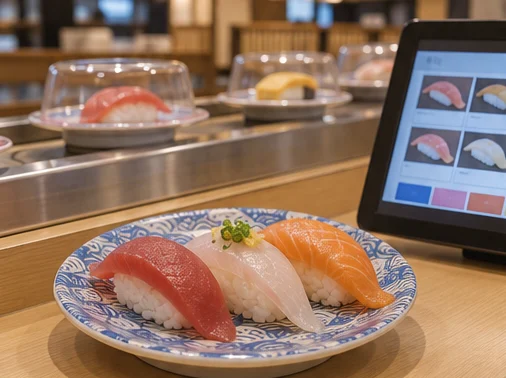
Use the touchscreen to order your first plate at Sushiro and know when to collect it. At order-only locations, the lane may stay empty between deliveries. On DigiRo, the sushi that scrolls past is on the display. The plates you order arrive on a lane serving your table. Sushiro lists English, simplified Chinese, and Korean on supported touch panels. Choose your food and confirm the order before waiting for it. Sushiro’s English guide
Check the cart before you confirm
Choose the item, check the quantity and price, then send the order. On Sushiro’s DigiRo system, tapping a dish moving across the display adds it to the selection. Confirm it with the order control in the cart. If you’re with someone and both tap the screen, check the quantity together before submitting. Sushiro’s DigiRo guide
Collect the plate that’s meant for you
Watch for the screen’s notice and follow the instructions for your table. If it’s unclear which plate is yours, leave it on the lane and ask これは私たちの注文ですか? (“Is this our order?”).
Before you leave, start the bill process
Look for 会計 on your screen or ask staff お会計はどうすればいいですか? (“How do we pay?”). Checkout steps and accepted payment methods can vary by branch. If you’re using a specific card or mobile wallet, check the branch’s payment information. Sushiro’s payment information
Related articles
Which Sushi Plate Is Yours at a Sushiro DigiRo Table?
Recognize when the sushi on the screen is an ordering option and when a plate has actually arrived for your table.
Read article →Jiro-Style Ramen: What to Say When Asked “Do You Want Garlic?”
Know what the staff are asking and have a short Japanese answer ready before your ramen arrives.
Read article →Where to Buy Ekiben at Sendai Station Before Your Shinkansen
Find the ekiben shop you can reach at Sendai Station, whether you are outside the gates, inside the Shinkansen concourse, or already on your platform.
Read article →